


La Crosse View
2.87.65K Reviews
App Specs
- Version
- 2.1.58-262d163a
- Updated On
- License
- Free
- Downloads
- 500,000+
- Developer
- La Crosse Technology
- Categories
- Weather
- Platform
- Android
Screenshots
 Analysis by AppCompare
I judge La Crosse View less as a general-purpose forecast app and more as a phone-based companion to La Crosse Technology weather equipment. That distinction matters: its most useful role is bringing readings and alerts from a compatible setup into your mobile routine, rather than replacing every weather source you already use. If you’re considering it, the first question is whether you own or plan to use the company’s Wi-Fi weather station or alert system. Without that connection, the reason to choose it over a familiar forecast app is much less compelling.
When a connection changes the experience
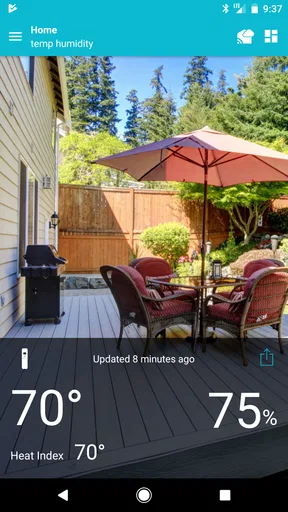
The app’s value depends on a chain of connections: your phone needs to reach the service, and the weather equipment needs to send its readings through its own network connection. When that chain is working, checking conditions measured around your home can answer a different question from a broad regional forecast: what is happening at my property right now? That’s useful for a garden, a patio, or a spot where conditions routinely differ from the nearest general forecast.
I’d treat the readings as a practical local reference, not as a guarantee that every screen will update at the instant the weather changes. If your phone has weak reception, the station loses its connection, or syncing is delayed, the app may not be the quickest route to current information. For a decision that cannot wait—such as whether severe weather is approaching—I would check a dependable forecast or official alert source as well, rather than relying on a single connected device.
Useful away from home, with a clear trade-off
Having a local station’s information on a phone is most helpful when I’m away from the place being measured. Before driving home, I might check whether the outdoor conditions there are very different from where I am. Someone looking after plants could use a sensor reading to decide whether to check the garden after work, while a person planning a weekend outside could compare home observations with a wider forecast. These are small decisions, but they’re exactly where a home weather setup can feel more useful than a generic app.
The trade-off is that this isn’t a self-contained weather experience in the usual sense. A person who only wants to open an app and see a forecast may find a standard weather service simpler, especially if they don’t own compatible equipment. I also wouldn’t install it expecting the phone alone to provide the same kind of property-specific measurements as a station. The app makes most sense as part of a system, and that makes it a more specialized choice than the weather apps many people already have.
A sensible routine for alerts and stale readings
Alerts can help draw attention to changing conditions, but they work best when they support a routine rather than replace one. I’d set only the notifications that would change what I do—perhaps a condition relevant to outdoor plans or a temperature concern at home—and avoid enabling every possible prompt. Too many alerts quickly become background noise, which defeats the point of receiving a timely heads-up.
If a reading appears out of date, I’d first check whether the phone has a working connection, then give the station a chance to sync before treating the display as current. If the issue persists, checking the equipment’s network connection and reopening the app are reasonable first steps. That kind of troubleshooting is a normal cost of connected home monitoring: it can provide more relevant local context, but it also adds more points where a connection or sync can interrupt the experience.
Worth Reading Before You Choose

EA SPORTS FC Mobile 26 Is a Bigger Football Game, but It Takes Time

Flipboard Shows What News Apps Must Do Beyond the Feed

Switching to Android Auto Means Rethinking Your Driving Routine

Google Calendar Makes a Crowded Week Easier to Manage

Ludo King Makes the Most of the Minutes Between Plans

Baby Panda World Brings Quick Play to Modern Phones, but Its Game Library Feels Busy
Features That Shine
First off, La Crosse View isn’t just about telling you if you need an umbrella or not. It’s packed with features that make it stand out from the typical weather apps you might have cluttering your home screen. The integration with La Crosse Technology’s weather stations is a game-changer. You can sync your app with a compatible weather station and get hyper-local weather data right from your backyard. Pretty neat, right?
Another feature that caught my eye is the customizable alert system. You can set up alerts for specific weather conditions like storms or temperature changes. This is super handy if you’re planning outdoor activities or just want to avoid getting caught in a surprise downpour.
User Experience
Navigating La Crosse View is a breeze. The user interface is clean and intuitive, which means you won’t be fumbling around trying to find what you need. The app is designed with the user in mind, making it accessible for both tech-savvy users and those who might be a bit more technologically challenged.
One of my favorite things about the app is the dashboard view. It’s like having a command center for all your weather needs, giving you everything from temperature and humidity to wind speed and direction. You can even add other sensors to track things like soil moisture if you’re into gardening.
Integration with Smart Home Technology
If you’re someone who loves smart home gadgets, you’ll appreciate how La Crosse View plays nice with other smart devices. It integrates smoothly with Amazon Alexa and Google Assistant, so you can get weather updates without even picking up your phone. Just ask your smart speaker, and voilà, you’ll know if it’s sweater weather or not.
Moreover, the app allows you to connect multiple devices, which is perfect for keeping tabs on weather conditions in different locations. Whether you’ve got a vacation home or just want to know what’s happening at grandma’s house across town, this app’s got you covered.
Visual Appeal
Let’s talk aesthetics for a moment. The graphics and visual representations in La Crosse View are top-notch. The app uses engaging icons and colors that don’t just look good but also help you quickly understand the data. Whether it’s a sunny icon or a stormy cloud graphic, it adds a bit of flair to your weather-checking routine.
Performance and Reliability
Now, what’s an app review without a little chat about performance? I’ve found La Crosse View to be pretty reliable. It updates in real-time, so you’re always getting the latest weather data. Plus, it doesn’t hog your phone’s resources, which is a huge plus. No one likes an app that drains your battery faster than you can say "thunderstorm."
Of course, no app is perfect, and while I didn’t encounter any major issues, some users have mentioned occasional sync delays. But honestly, the team behind the app seems pretty responsive to feedback, so I wouldn’t be surprised if they iron out these kinks sooner rather than later.
What to consider before relying on it
For a realistic day-to-day example, imagine getting ready to leave for work while rain threatens. A nearby forecast gives you the broad picture; a station at home tells you what its sensors are seeing at your own location. I’d use that local information to decide whether to cover a plant or bring cushions inside, then consult a wider forecast before changing a commute or making a safety decision. The two sources answer different questions, and using them together is more sensible than expecting one app to do everything.
There’s also a useful distinction between monitoring a place and forecasting the day. Sensors can help you understand conditions where they are installed, while a general weather service is often the more natural choice for planning a trip or checking conditions somewhere you don’t monitor. If your main need is rain timing for a route, broad forecasts and radar may be a better fit. If your main need is what’s happening around a home station, this app has a clearer purpose.
People with several relevant locations may appreciate being able to keep an eye on more than one setup, but I’d organize the habit around a specific decision for each place. For example, checking a second property makes sense if someone there needs attention when conditions change; checking it out of curiosity can become clutter. A focused setup is easier to interpret and makes alerts more meaningful.
Who will get the most from it
I’d recommend this to someone who already uses compatible La Crosse Technology equipment, wants to see its local measurements on a phone, and is willing to troubleshoot a connection now and then. Gardeners and people who manage outdoor spaces can get particular value from combining local readings with a sensor suited to their needs. It can also make sense for someone who checks conditions at a second location, provided the equipment there is part of the same connected routine.
I’d skip it if you want a straightforward forecast without buying or maintaining weather equipment, or if you mainly need travel forecasts and severe-weather coverage from one app. A general weather app is usually less dependent on a home network and easier to use immediately. The choice isn’t that one approach is universally better: La Crosse View is more personal to a monitored property, while a conventional forecast app is more convenient for quick, broad planning.
Cost, compatibility, and expectations
The app is free to install, though in-app purchases range from $1.99 to $29.99 per item. I’d check that the specific station or alert system you own is compatible before building a routine around it, and look at any purchase details in the app before committing. The key practical question is not simply whether the app costs anything to download, but whether its connected features match equipment you actually have and intend to use.
La Crosse Technology developed this weather app, which is rated for Everyone. It has an average rating of 2.8 from around 15,000 ratings, alongside about 7,600 written reviews, so I would approach it with measured expectations rather than assuming every setup will feel seamless. It has been available since August 25, 2017, and version 2.1.17-38543088 requires Android 6.0 or later. Its 500,000-plus installs suggest a meaningful audience, but the best indicator for an individual user is still whether their equipment and home network cooperate reliably.
Final Thoughts
All in all, La Crosse View is a solid choice for anyone looking to get more out of their weather app. Whether you’re a weather geek or just someone who likes to be prepared, this app offers a little something for everyone. The integration with weather stations and smart home devices, combined with a user-friendly interface and reliable performance, makes it a strong contender in the weather app arena.
So, if you’re ready to take your weather-watching game to the next level, give La Crosse View a try. You might just find yourself checking the weather more often—not because you need to, but because it’s actually kind of fun.
Pros
- User-friendly interface for easy navigation.
- Real-time weather updates and alerts.
- Customizable notifications for specific data.
- Compatibility with multiple La Crosse devices.
- Seamless integration with smart home systems.
Cons
- Limited features without paid subscription.
- Occasional sync issues with devices.
- Ads can be intrusive at times.
- Requires constant internet connection.
- Battery drain on constant use.
FAQs for La Crosse View
What is La Crosse View and how does it work?
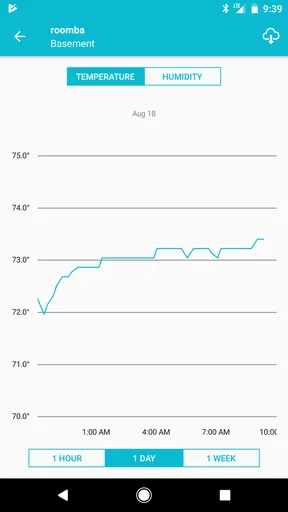
La Crosse View is a smart weather station app that connects with compatible La Crosse View devices. It provides real-time weather updates, personalized alerts, and historical data. The app syncs with various sensors to deliver accurate weather information directly to your smartphone, allowing users to monitor local and remote conditions seamlessly.
Is La Crosse View compatible with all devices?
La Crosse View is designed for both Android and iOS platforms. However, it requires specific La Crosse View-enabled weather stations and sensors. Before downloading, ensure your device is compatible by checking the app requirements and supported devices on the official website or app store listing.
How user-friendly is the La Crosse View app?
La Crosse View boasts an intuitive interface, allowing users to easily navigate through features. It offers customizable dashboards, straightforward setup instructions, and integration with smart home systems. Even users new to smart weather systems will find it accessible, making weather monitoring a hassle-free experience.
What kind of data and alerts does La Crosse View provide?
La Crosse View offers a comprehensive range of data such as temperature, humidity, wind speed, and rainfall. Users can set personalized alerts for specific weather conditions or thresholds. This ensures that you are always informed about significant weather changes, helping you plan your day effectively.
Are there any additional costs associated with using La Crosse View?
While the La Crosse View app itself is free, additional costs may arise from purchasing compatible weather stations and sensors. Some advanced features or integrations might also require a subscription. It's advisable to review the app's details and user agreements for any hidden fees before proceeding.


